Muita
A downloadable tool for Windows
Clean it, set it, ship it — one window, no internet.
Muita is a desktop editor for people who translate and typeset webtoons, manhwa and manga. It gathers the jobs you normally split between an image editor, an OCR tool and a spreadsheet — finding the bubbles, reading the source text, cleaning, repairing the art underneath and setting your translation — into a single, keyboard-driven window.
You write the translation. Muita does everything around it.
How a chapter goes
- Open the chapter folder. Pages (WEBP / JPG / JPEG) appear in a list with their progress. Pages 20,000 px tall scroll smoothly.
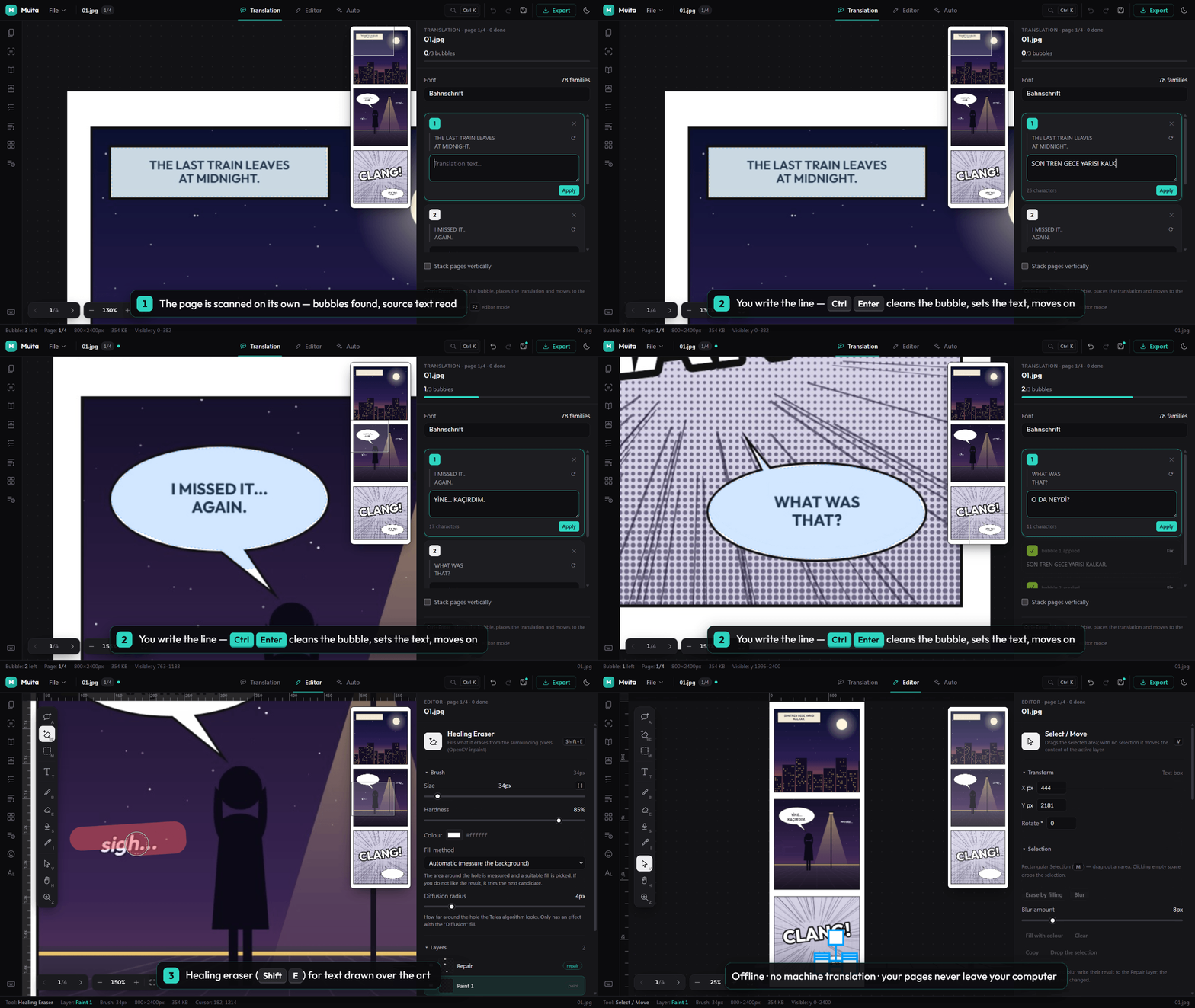
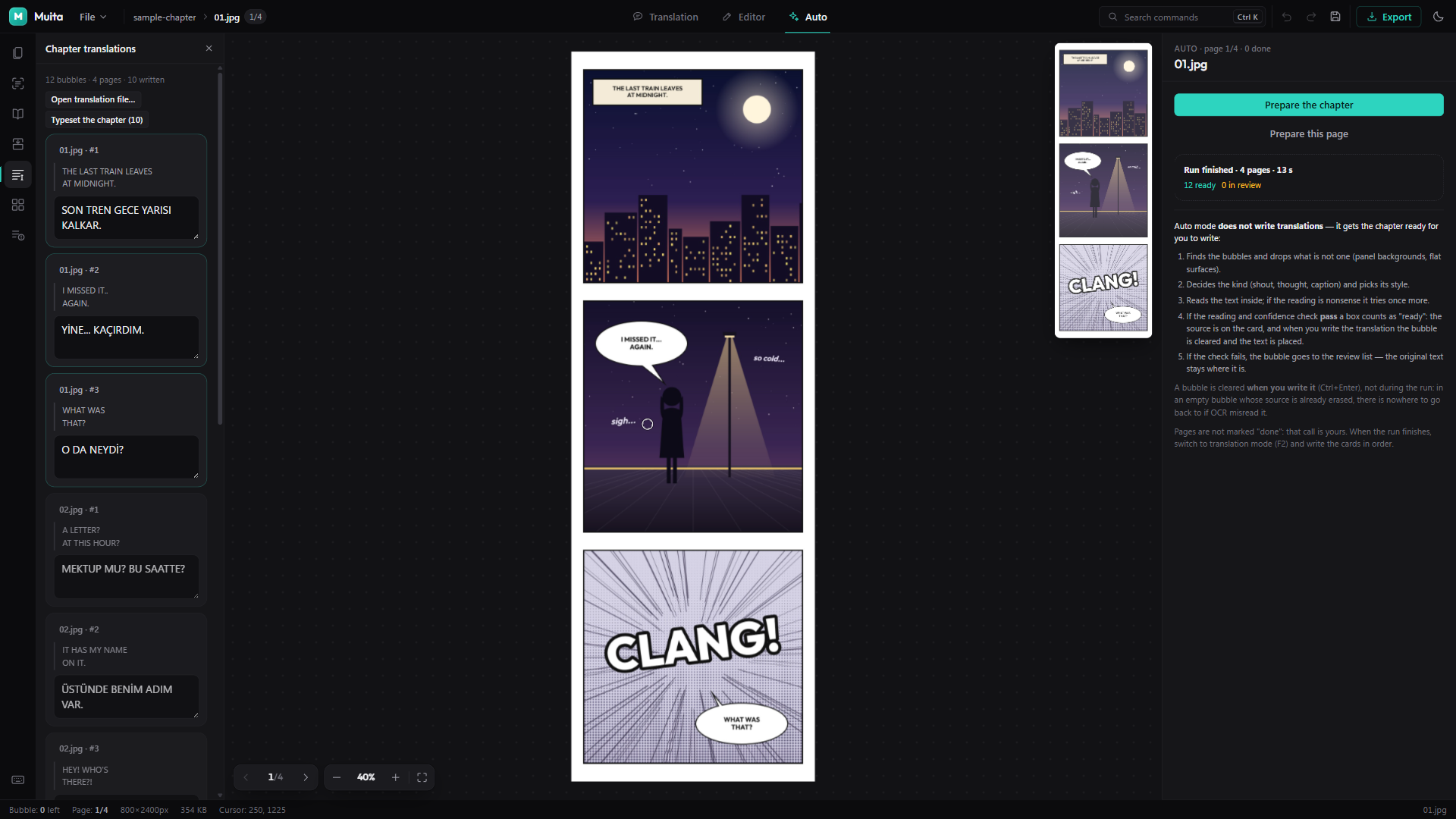
- Run the preparation pass. Muita finds every speech bubble, reads the source text and merges pages where a bubble was cut in half at the page edge. Boxes it could read cleanly are marked ready; the rest are flagged for you to look at.
- Write your translation in one list for the whole chapter — or import a script file you already wrote.
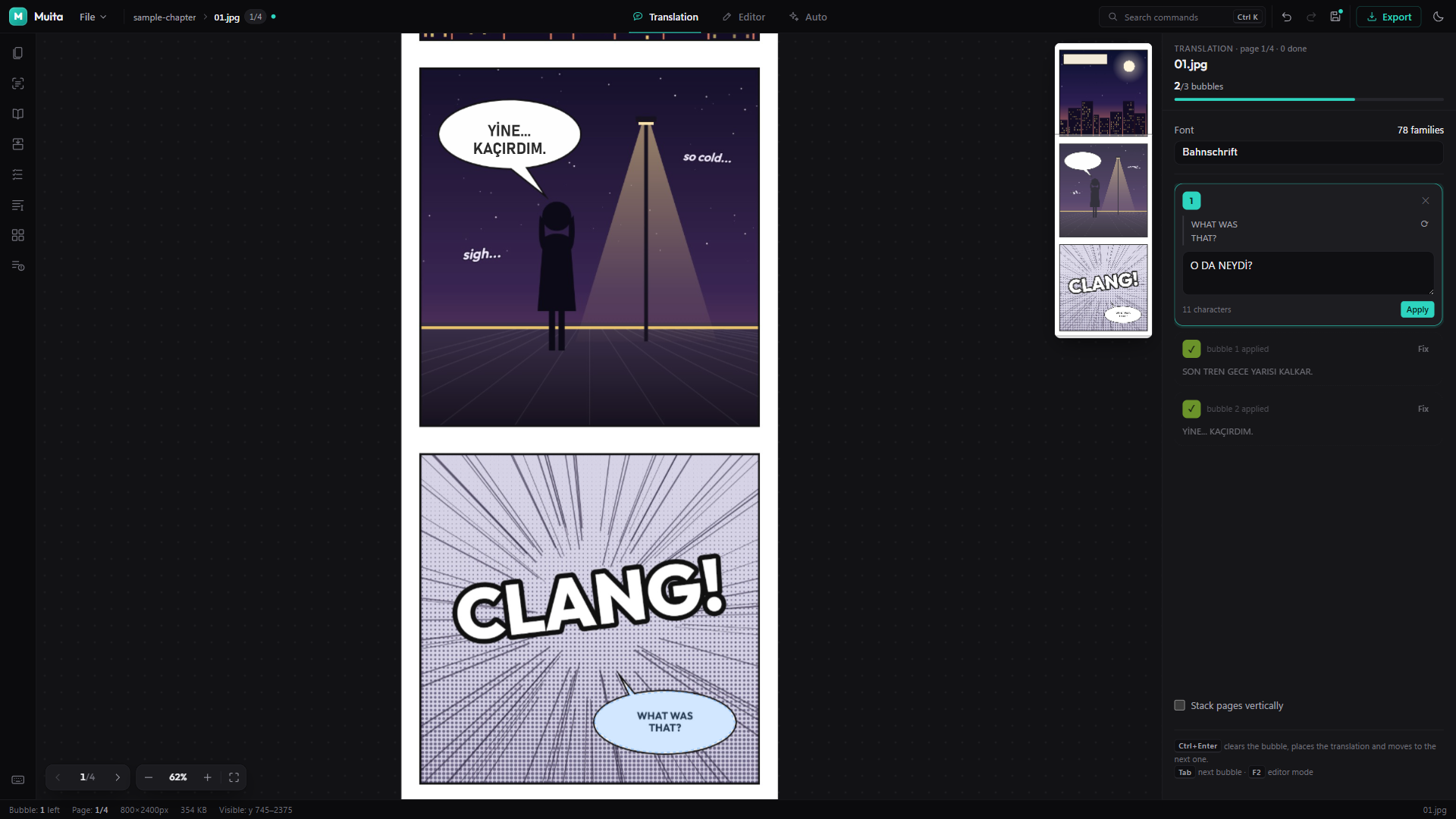
- Typeset. Ctrl+Enter cleans the bubble, sets your line and moves to the next one. Or set the whole chapter at once, one undo step per page.
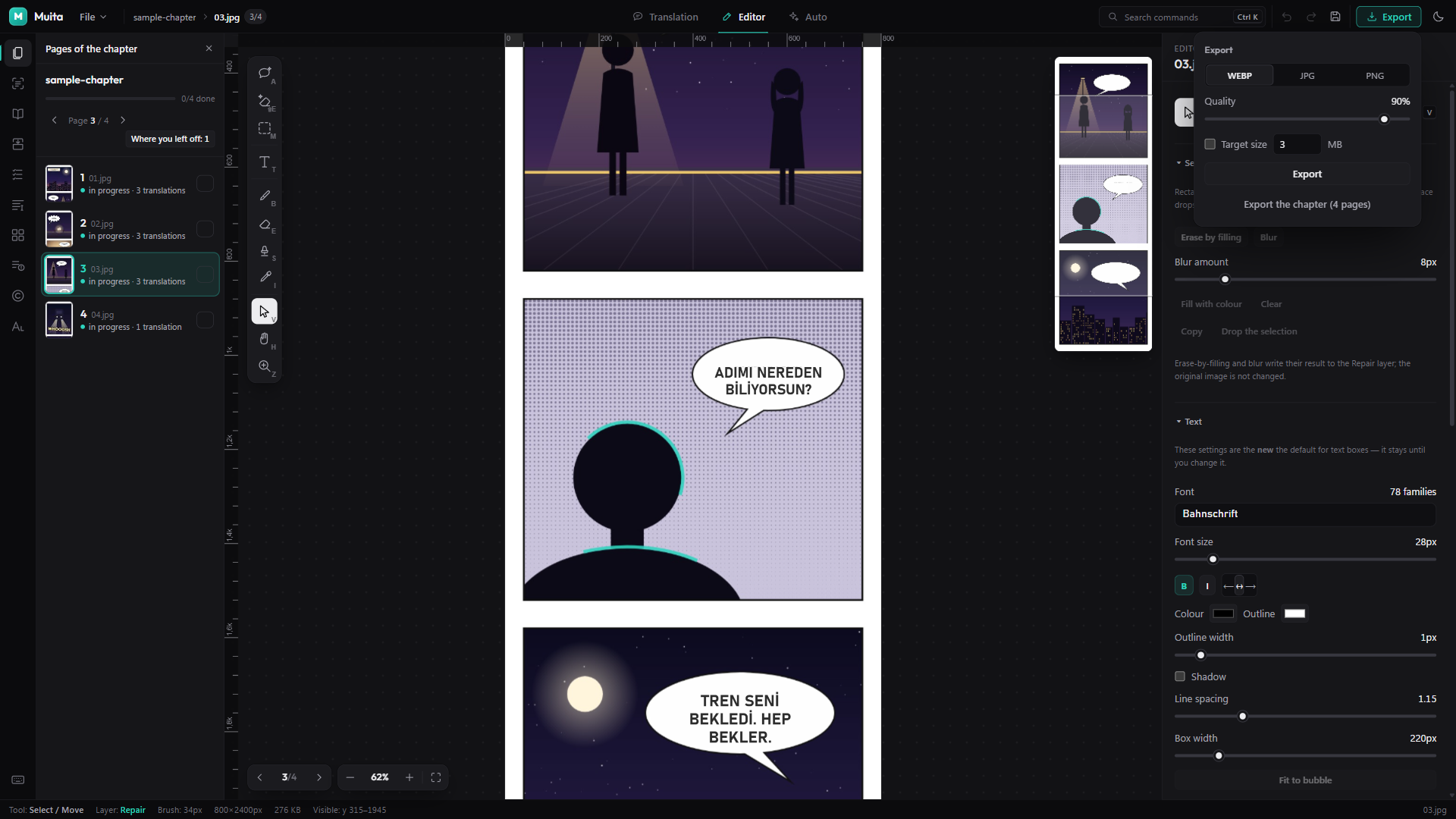
- Check and export. A contact sheet shows every page with what is left to do; overflowing text is listed. Export to PNG, JPG or WEBP with a target file size.
What is inside
- Bubble detection — an on-device detection model finds where the bubbles are; classic contour analysis measures their exact outline, background and type (speech, shout, thought, narration).
- Source text reading (OCR) — English, Korean, Japanese (horizontal and vertical) and Simplified Chinese. English uses a dedicated recogniser tuned for comic lettering.
- Shape-aware typesetting — lines are broken to follow the bubble's real outline, not its bounding box, so round bubbles fill like a letterer would fill them. Shouts, thoughts and narration can each get their own style automatically.
- Bubble cleaning that rebuilds the bubble's own gradient instead of painting it flat white.
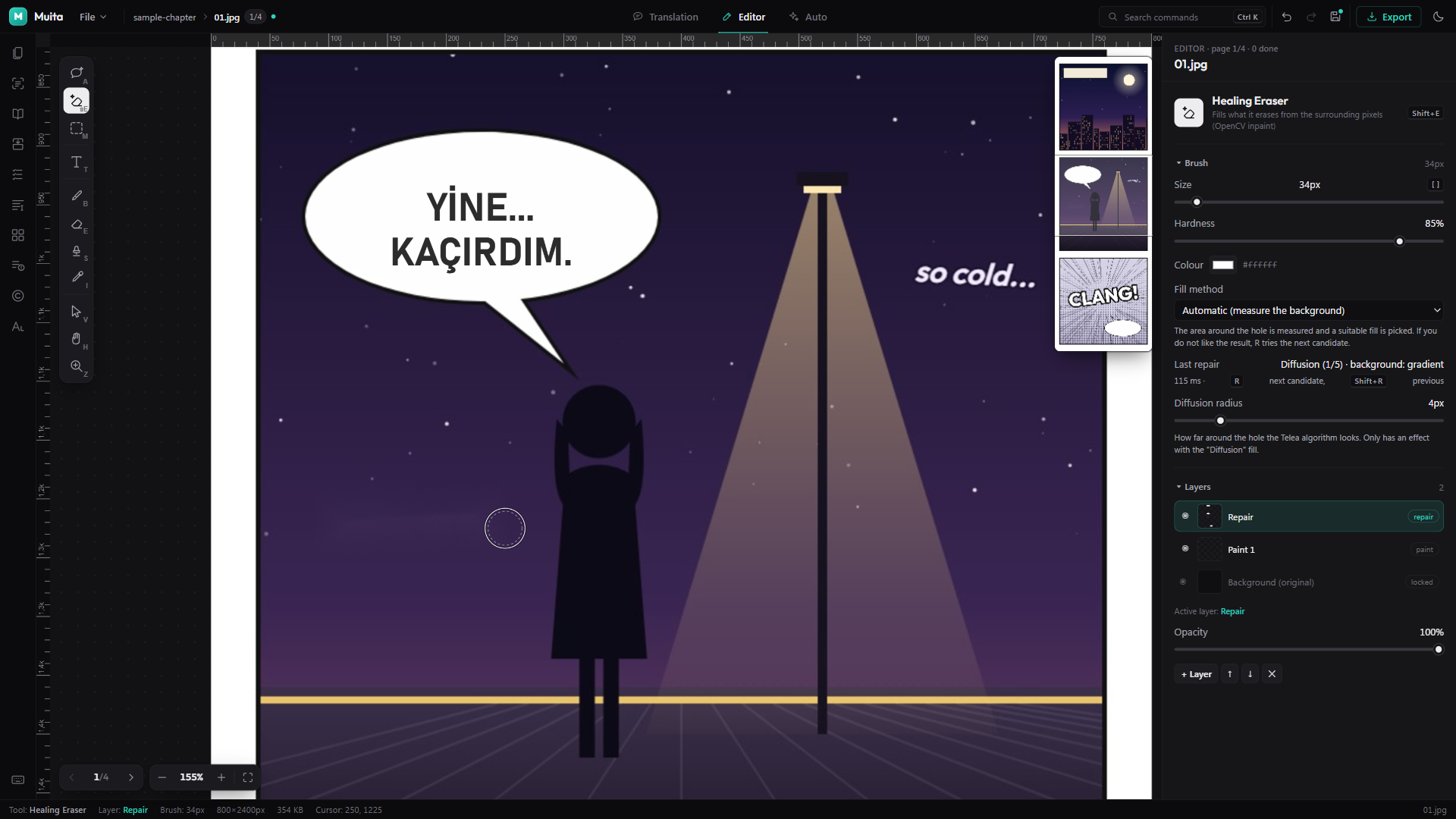
- Healing eraser (Shift+E) for text drawn over the art. It measures what is around the hole — flat colour, gradient, screentone or texture, a line running through it — and picks a fill for that surface. Not happy? R tries the next fill on the same spot. Large sound effects over busy art may still need a touch-up with the clone stamp.
- A real editor — layers, brush, normal eraser, clone stamp, eyedropper, selections, rulers and guides with snapping, placed images, 40 steps of undo.
- Photoshop-style shortcuts and a command palette (Ctrl+K) that reaches every command.
- Series memory and glossary — the lines and terms you set are remembered per series and offered back as hints, never filled in behind your back.
- Your credit on your pages — put your own logo or credit on every Nth page at export.
- Autosave and crash recovery.
What it deliberately does not do
- No machine translation. Fluent-sounding wrong sentences are the hardest mistakes to catch, so Muita leaves the translating to you.
- No generative AI. Cleaning and repair are classic image processing. The two models Muita uses (bubble detection and text recognition) measure the page; they do not invent anything, and a wrong reading stays visible next to the original.
- No account, no cloud, no telemetry. Muita makes no network requests while you work. Your pages never leave your computer.
Languages
The interface is in English and Turkish.
Typesetting, cleaning and repair work for any Latin-script target language. The writing aids — hyphenation, the built-in title and sound-effect dictionaries, and the translation check — are tuned for translating into Turkish.
Fonts
Muita installs no fonts; it uses the ones on your computer and lists the well-known comic fonts you have installed at the top. Commercial comic fonts need their own licence from their foundry. Free alternatives such as Bangers, Anton and Comic Neue work well.
Try it first
There is a free demo. It is the same program, with the same detection, OCR, cleaning, repair and typesetting — but it works on the first 3 pages of a chapter, every export carries a watermark, and saving projects, chapter-wide typesetting and batch export are off. Enough to see how it handles your own pages before you pay for it.
System requirements
- Windows 10 or 11, 64-bit
- 8 GB RAM recommended for long webtoon pages
- About 500 MB of disk space
Installing
Download Muita-Setup and run it. Prefer not to install? The portable zip runs from any folder.
Muita is not code-signed yet, so Windows may show “Windows protected your PC” the first time. Click More info → Run anyway. That warning is about the missing signature, not about anything the program does.
Licence
One payment, yours to keep. Use Muita for personal and commercial work, including paid translation and typesetting jobs, on the computers you personally use. It does not expire and never asks for an account or a connection. Updates posted on this page are included.
Working as a team? Each person who uses Muita needs their own copy.
Everything you make with Muita belongs to you or to the rights holders you work for.
Türkçe
Muita, webtoon, manhwa ve manga çevirmenleri ile dizgicileri için çevrimdışı çalışan bir masaüstü editörü. Baloncukları bulur, kaynak metni okur, baloncuğu temizler, alttaki çizimi onarır ve senin yazdığın çeviriyi baloncuğun şekline göre dizer. Çeviriyi sen yazarsın; gerisini Muita yapar.
Ücretsiz demo var: aynı program, bölümün ilk 3 sayfasında; dışa aktarılan sayfalarda filigran, proje kaydı ve toplu işler kapalı. Kendi sayfalarında denemek için yeterli.
Arayüz Türkçe ve İngilizce. Tireleme, terim ipuçları ve şüphe denetimi Türkçeye çeviri için ayarlı. İnternet, hesap ve abonelik yok; tek seferlik ödeme.
Purchase
In order to download this tool you must purchase it at or above the minimum price of $15 USD. You will get access to the following files:
Download demo
Leave a comment
Log in with itch.io to leave a comment.